Love Note & Doodle Widget for Couples on iPhone: 9 Apps (2026)
Nine iPhone apps that put a note or doodle on your partner's Home Screen, compared on Lock Screen support, minimum iOS, and price. Checked 6 November 2026.
| App | What lands on your partner's widget | Doodles | Photos | Lock Screen | Min. iOS | One plan for both | Cost |
|---|---|---|---|---|---|---|---|
| drawn | A drawing, or a photo with a text overlay | Yes | Yes | Lock Screen widgets (release notes) | iOS 15.1 | Yes | Free; Premium $5.99 a month or $39.99 a year |
| HeartSee (our app) | A mood, a note, or a doodle | Yes | Not stated | Widgets yes; notes on the Lock Screen not stated | iOS 15.1 | Yes (release notes) | Free; Premium $4.99 to $12.99 a month, $19.99 to $39.99 a year, $7.99 a week |
| heartpair | Doodles or short messages | Yes | Not stated | Not stated | iOS 16.0 | Not stated | Free; subscription $4.99 a month or $49.99 a year (description) |
| LoveBomb | One drawing you can change anytime; no typed text | Yes | Not stated | Not stated | iOS 17.0 | No purchases listed | Free |
| LoveFlow | A handwritten note, a drawing, or a photo | Yes | Yes | Not stated | iOS 18.0 | Not stated | Subscription for all features: $3.99 a week or $6.99 a month |
| lovelee | Their newest letter or doodle | Yes | Not on the widget | Lock Screen widgets (release notes) | iOS 17.2 | Yes | Free; pro $4.99 a week, $7.99 a month, $24.99 a year, $39.99 lifetime |
| LoveSketch | Drawn notes; no typed text | Yes | Not stated | Not stated | iOS 17.6 (its description says 16.0) | Not stated | Free: 1 canvas and 2 sends a day; Premium $2.99 to $6.99 a week or $24.99 a year |
| Loveya | A handwritten note that replays stroke by stroke | Yes | Yes (Premium) | Note widget for the Lock Screen (release notes) | iOS 26.0 | Yes | Free; Premium $9.99 a month or $29.99 a year |
| Pairly Widget | A note, a doodle, or a photo | Yes, plus a live shared canvas | Yes | Live drawing as a Lock Screen Live Activity | iOS 16.4 | Yes | Free; Pro $2.99 a week, $29.99 a year, $49.99 lifetime |
Which app sends a love note to your partner's iPhone Home Screen?
iPhone has no built-in way to put a message on someone else's Home Screen, so both of you install the same app, pair, and add its widget. Nine apps do this. They differ in format (typed note, drawing, or photo), Lock Screen support, and the iOS version they need. HeartSee, which publishes this page, is one of the nine.
All nine are iPhone apps and none of the listings mentions Android. Most are new: on 6 November 2026 the US App Store showed 941 ratings for lovelee, 20 for Loveya, 13 for HeartSee, 4 for heartpair, and 2 for drawn, while LoveBomb, LoveFlow, LoveSketch, and Pairly Widget had too few to display.
- If you want to type a short note, not draw: drawn, HeartSee, heartpair, lovelee, or Pairly Widget.
- If you only want drawings: LoveBomb, LoveSketch, or Loveya, which describe drawn or handwritten notes only.
- If you want photos on the widget too: drawn, LoveFlow, Loveya, or Pairly Widget.
- If one iPhone is older: drawn and HeartSee need iOS 15.1, heartpair iOS 16.0.
- If you want a note plus mood, distance, and a shared streak in one app: HeartSee.
How was this comparison made?
HeartSee publishes this article and is one of the nine apps. There are no paid placements and no affiliate links. Every fact in the table comes from the app's US App Store listing or its release notes, checked on 6 November 2026; the HeartSee row also uses our own app screenshots. We did not test every app hands-on. "Not stated" means we did not find it in the listing, not that the app cannot do it.
Two names that come up in searches for this topic are left out. The listing for Bondly: Couples Widget & Draw was unavailable in the US store, and the current Bondly app describes its note widget only in release notes. Little Things: Love Notes is a shared notes app whose listing does not say what its widget shows.
Related reading: Read our review methodology
Can I send a note to my partner's Home Screen without an app?
No. iOS does not include a widget that shows a note from another person, and widgets only show content from apps installed on that iPhone. Without a couples app, the closest option is a text scheduled in Messages: it arrives at the time you choose, but in their Messages, not on their Home Screen.
A couples app adds three things a text does not: the note stays visible on the widget until the next one replaces it, it does not need a reply, and your partner sees it simply by unlocking the phone.
Can I send a doodle instead of a note?
Yes. All nine apps send drawings to the partner's Home Screen widget, and LoveBomb, LoveSketch, and Loveya are built around drawings rather than typed text. Pairly Widget also lets you draw together in real time and shows it in a Lock Screen Live Activity.
The differences are in the details. Loveya replays every stroke as it was drawn and lets your partner draw on your note and send it back. LoveBomb keeps one drawing on each partner's screen that you can change anytime. drawn adds text on top of a photo. LoveSketch's free tier allows 1 canvas and 2 sends a day.
How do I send a note or doodle with HeartSee?
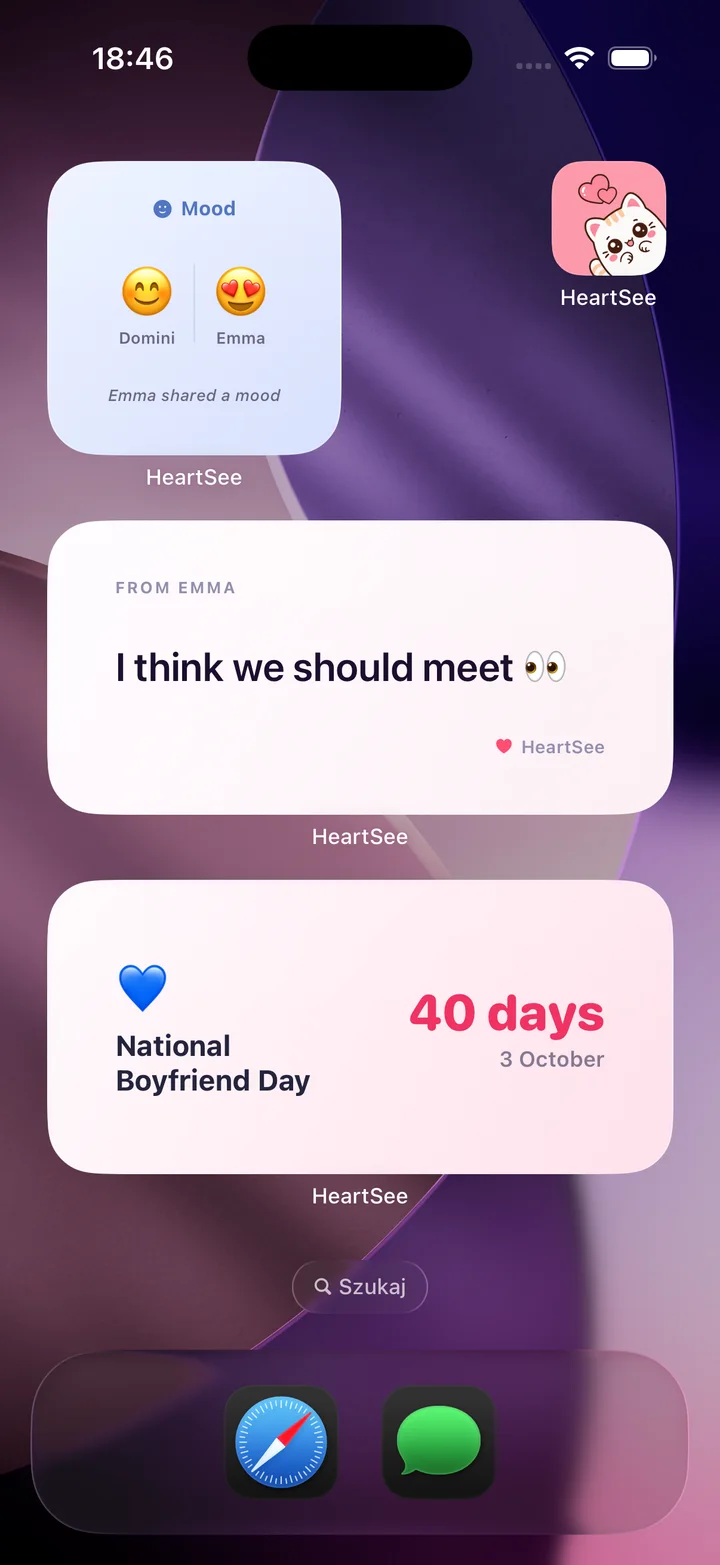
HeartSee's App Store description says you can "send a mood, a note or a doodle straight to your partner's Home Screen". The note widget in the picture above shows the latest message with the sender's name, such as "From Emma: I think we should meet". Our screenshot of the drawing screen shows a row of eight pen colours, undo and clear buttons, and Cancel and Send.
HeartSee's widgets can go on the Home or Lock Screen, but the listing does not say whether notes and doodles appear on the Lock Screen, so this guide covers the Home Screen only.
- Both of you install HeartSee and pair with an invite code or a link.
- Each of you adds the HeartSee note widget to your Home Screen.
- Write a note, or draw one in a colour you like, and send it.
- Your partner's widget shows it, and the 1.10.6 release notes say they get a notification when you send a note or drawing.
- If the widget looks out of date, open the app once; iOS decides when widgets refresh.
Related reading: HeartSee couples widgets for iPhone · Mood widget for couples on iPhone: 8 apps compared
Why didn't my note show up on their widget?
Usually because iOS has not refreshed the widget yet. Widgets do not update the moment you press Send; the system decides when, and Low Power Mode can delay it further. Some apps work around this: Loveya lists real-time widgets on iOS 26, and LoveSketch describes notes that appear instantly.
If a note still does not appear after your partner opens the app, check the basics before reinstalling anything.
- Your partner has added the widget from the same app you used to send the note.
- You are both paired with each other, not with an old invite.
- Notifications and Background App Refresh are on for the app.
- Low Power Mode is off, or your partner opens the app once.
Related reading: Couples widget not updating? Fixes for iPhone
What should we write in a widget note?
Something short that still makes sense hours later. A widget note is read whenever your partner next looks at the phone, which may be the middle of their night if you live in different time zones, so write for the moment they will see it, not the moment you send it.
- "Good morning from yesterday" when you are behind them in time.
- "Sleep well, I'll be up when you wake."
- "Thinking about our walk by the river."
- "12 days." when a visit is coming.
- "Proud of you today." before an exam or a big meeting.
- "Call me when you're free, nothing urgent."
- A doodle of something you saw today, without words.
Related reading: Time zone widget for couples: see your partner's local time
What data do love note apps declare in their privacy labels?
Notes and drawings are personal, so check the App Privacy section of a listing before you choose. It shows categories rather than exact uses. This is what the US listings showed on 6 November 2026.
- LoveBomb: Data Not Collected.
- drawn: purchases, email, IDs, usage data, and precise location linked to you.
- HeartSee: identifiers used to track you; purchases, name, other user content, and device ID linked to you; precise location not linked to you.
- heartpair: purchases, identifiers, and usage data used to track you.
- LoveFlow: identifiers used to track you; messages, photos, contact info, and usage data linked to you.
- lovelee: name, email, messages, photos, and user ID linked to you.
- LoveSketch: email, name, and device ID linked to you.
- Loveya: purchases, coarse location, name, photos, and IDs linked to you.
- Pairly Widget: purchases, email, phone number, photos, and IDs linked to you; its listing says eligible note images are encrypted on the device, but live canvas images are not end-to-end encrypted.
Frequently asked questions
Is there a love note widget for couples on iPhone?
Not built into iOS, but several apps add one. drawn, HeartSee, heartpair, LoveBomb, LoveFlow, lovelee, LoveSketch, Loveya, and Pairly Widget all put a note or drawing on your partner's Home Screen widget once you both install the same app and pair.
Do both partners need the app to send notes to each other's widget?
Yes. The app pairs two accounts, so both of you install it, connect (usually with a code or a link), and each adds the widget on your own iPhone.
Which love note widget works on the Lock Screen?
Release notes for drawn and lovelee mention Lock Screen widgets, and Loveya's mention a note widget for the Lock Screen. Pairly Widget shows live drawing as a Lock Screen Live Activity. HeartSee has Lock Screen widgets, but its listing does not say whether notes appear there.
Is there a free love note widget app?
LoveBomb listed no in-app purchases on 6 November 2026. LoveSketch's free tier allows 1 canvas and 2 sends a day. LoveFlow says all features require a subscription. The others are free to download with optional paid plans.
Does my partner get a notification when I send a note?
In HeartSee, yes: version 1.10.6 notifies your partner when you send a feeling, note, or drawing. Loveya's listing also says you are notified when your partner sends a note. Other listings do not say.
Is there a love note widget for Android and iPhone together?
None of the nine listings we checked mentions an Android version, so assume both partners need an iPhone. HeartSee is iPhone only.
Sources and product information
Product and platform details were checked against these official pages. Store availability, pricing, and iOS behavior may change.
- Apple: Add, edit, and remove widgets on iPhone
- Apple: Schedule a text message on iPhone to send later
- drawn on the App Store
- HeartSee on the App Store
- heartpair on the App Store
- LoveBomb on the App Store
- LoveFlow on the App Store
- lovelee on the App Store
- LoveSketch on the App Store
- Loveya on the App Store
- Pairly Widget on the App Store