Best Couples Apps for iPhone: 9 Ways to Stay Connected
Find the best couples app for iPhone by the job it does: widgets, private notes, games, distance, countdowns, memories, moods, and daily rituals.
Choose a couples app by what you want to feel
Searching for the best couples apps for iPhone produces a crowded list of chat tools, widgets, games, calendars, and photo apps. A shorter route is to decide what kind of moment you want the app to create. Do you want to see your partner at a glance, plan time, discover something new, or keep a shared story?
HeartSee combines several of those jobs in one private iPhone app for two. You do not need every feature. You need the smallest set that both people will use willingly.
1. Put your relationship on the Home Screen
A good couples widget turns an unlock into a small moment of recognition. HeartSee widgets can surface a mood, note, countdown, streak, or other selected signal without asking for an immediate reply.
Choose a layout that stays readable and only show content you are comfortable displaying around others. iOS controls refresh timing, so treat widgets as gentle snapshots rather than permanently live dashboards.
2. Use the Lock Screen for a faster glance
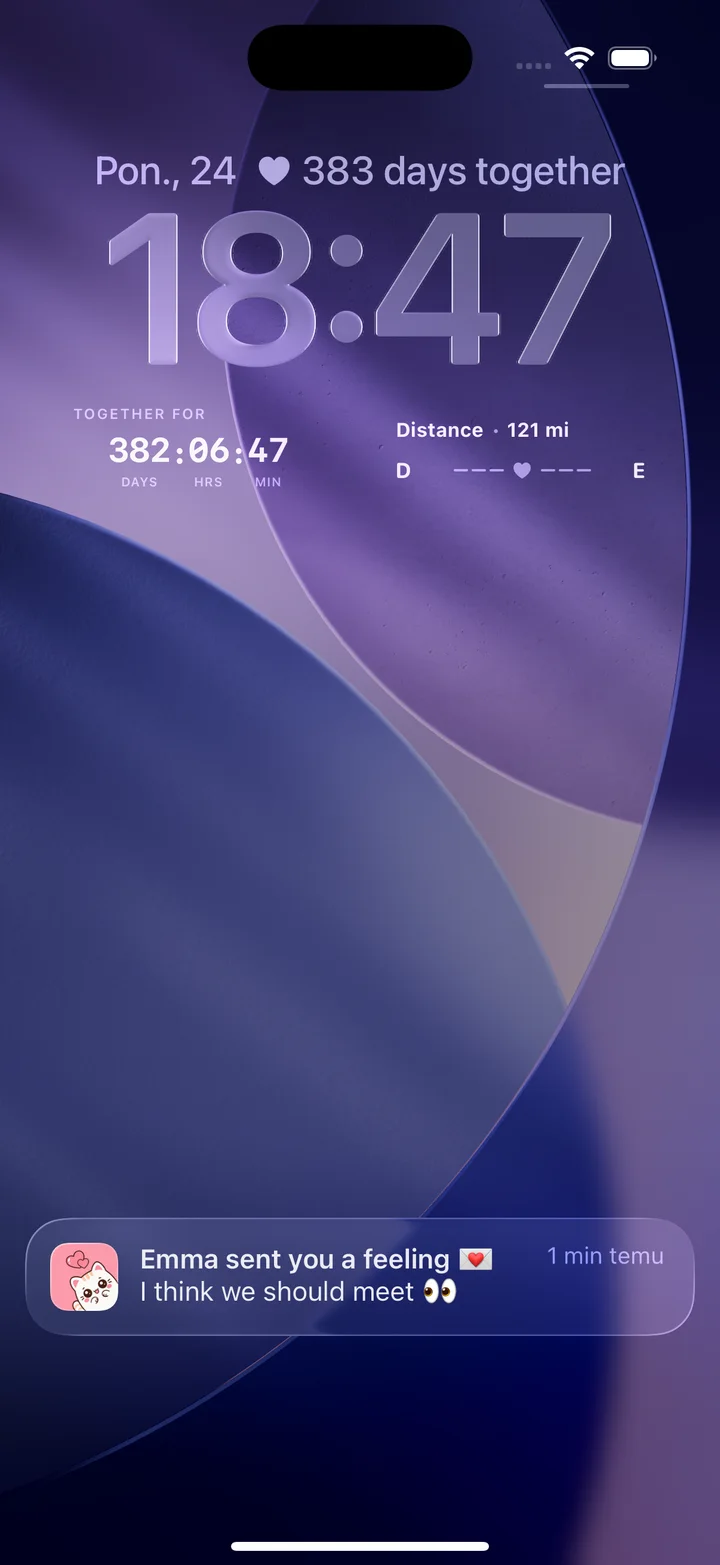
Lock Screen space is limited, which is why it can feel meaningful. A compact days-together or distance widget keeps one shared fact close to the clock. HeartSee supports Home and Lock Screen experiences, letting each partner choose how visible the relationship should be.
A loving note may be welcome at home but awkward in a meeting. Agree on what can appear and review notification previews; each person can choose different settings.
4. Send a note or drawing that feels personal
Typing is efficient, but handwriting and drawing carry personality. A two-minute sketch, crooked heart, or private joke can feel more intentional than another reaction emoji. HeartSee lets partners create drawings and notes that travel to the other person's screen.
This works during busy days because the message does not need to become a conversation immediately. It simply leaves evidence that one person crossed the other's mind.
5. Play a couple game in five spare minutes
Games remove the pressure to invent a topic. A You or Me question, favorites round, or This or That choice can reveal a funny disagreement and open a longer conversation. HeartSee includes quick games designed for short shared breaks.
Keep the tone curious. A wrong guess is an invitation to learn, not proof that somebody is inattentive. The best game ends with a story you had not heard before.
6. Keep distance visible without creating surveillance
Seeing the miles or kilometers between you can make long distance concrete and progress toward a visit feel real. HeartSee can show partner distance when both people grant the relevant iPhone permissions.
Consent is essential. Distance should be a connection cue, not a way to check where someone is or question their movements. Review permissions together and change them whenever either person wants.
7. Count down to a visit or meaningful date
A confirmed date gives distance an edge. Keep the next meeting, anniversary, or celebration visible so anticipation becomes part of ordinary days. A countdown works best after travel, budget, and availability are genuinely agreed.
HeartSee widgets can bring important dates closer to the Home Screen. HeartSee also offers a free browser-based next-meeting countdown that stores the selected date locally.
- Confirm the date before displaying it.
- Include the time zone in travel plans.
- Plan one anchor activity and leave room to rest.
8. Save memories outside the camera roll
A camera roll mixes relationship milestones with receipts and screenshots. A dedicated album and timeline give selected moments context: the first visit, an ordinary Tuesday, or a note about what made the day memorable.
HeartSee combines a shared album with a relationship timeline. Add less than you capture; one image and one useful sentence are more likely to be revisited than hundreds of unsorted files.
9. Build a ritual small enough to survive busy weeks
The most valuable feature may be repetition. A mood after breakfast, one game on Friday, or a saved memory after every visit creates continuity. HeartSee streaks and relationship XP make that rhythm visible, but the number should celebrate connection rather than judge it.
Choose one ritual and test it for a week. If it feels warm and easy, keep it. If it creates guilt, reduce the frequency. An app belongs on both phones only while it serves both people.
A practical iPhone couples-app checklist
Before pairing, confirm iOS compatibility, current free and paid features, what data is shared, and how to disconnect. Test notifications and widgets on both phones. Look for clear permission explanations and avoid absolute promises about background updates iOS does not let apps control.
HeartSee is currently for iPhone, free to download with optional in-app purchases. Both partners pair with a code. If that matches your devices and goals, begin with one widget and one daily signal instead of enabling everything at once.
Frequently asked questions
What is the best couples app for iPhone?
The best choice depends on your goal. HeartSee is an all-in-one private iPhone app for widgets, distance, moods, drawings, games, streaks, countdowns, and shared memories.
Can couples put widgets on the iPhone Lock Screen?
Yes. Supported apps such as HeartSee can provide Home and Lock Screen widgets. Available sizes and refresh timing are controlled partly by iOS.
Does HeartSee work on Android?
HeartSee is currently available for iPhone only. Both partners need a compatible iPhone for the paired experience.
Are couples apps only for long-distance relationships?
No. Couples living together can use games, moods, widgets, shared dates, and memories. Long-distance couples may rely more on asynchronous and visit-planning features.