Days Together Widget for iPhone: Keep Your Count on the Home and Lock Screen
Put your days-together count on the iPhone Home or Lock Screen. Six counter apps compared on pairing, Lock Screen, iOS version, and price, checked October 2026.
| App | Pairs with partner | Home Screen | Lock Screen | How it counts | Min. iOS | Cost |
|---|---|---|---|---|---|---|
| Couple Widget: Love Countdown | Shared posts (Couple Connect); counter sync not stated | Yes (photo themes) | Not listed | Real-time days together | iOS 15 | Free; no in-app purchases listed |
| Couple Widgets: Keep Memories | Not listed | Yes | Not listed | Days in love | iOS 13.0 | Free; Premium $1.99 a week to $19.99 a year |
| HeartSee (our app) | Yes (invite code or link) | Yes | Yes (days together, timer) | Days, plus a days, hours, and minutes timer | iOS 15.1 (Lock Screen: iOS 16) | Free; Premium $4.99 to $39.99, weekly $7.99 |
| inlove - Couple Day Counter | Not listed | Yes (small, medium, large) | Not listed | Years down to seconds | iOS 15.1 | Free with ads; in-app purchases $0.99 to $3.99 |
| LoveClock - Couple Countdown | Yes (same countdown on both phones) | Yes | Yes | Days, weeks, months, or a full breakdown | iOS 18.0 | Free core; Premium $1.99, lifetime $39.99 |
| Loveling: Our Love Widgets | Yes ("both counting the same days") | Yes (with a photo) | Yes | "Together for" counter | iOS 17.0 | Free; Love Plus $3.99 to $34.99 |
Can you put a days-together counter on your iPhone screen?
Yes, but not with Apple's own widgets. iOS has no widget that counts up from the day you got together, so you need a counter app with a widget. Choose by three things: whether your partner sees the same count, whether it fits on the Lock Screen, which needs iOS 16, and what else the app does.
The six apps in the table are free to download. Two of them say plainly that both partners see the same count, and three describe Lock Screen widgets. On 25 October 2026 the US App Store showed about 3.7 thousand ratings for Couple Widget: Love Countdown, 731 for Loveling, 379 for inlove, 265 for Couple Widgets: Keep Memories, 13 for HeartSee, and 1 for LoveClock.
How was this comparison made?
HeartSee publishes this article and is one of the six apps. There are no paid placements and no affiliate links. Every fact about the other apps comes from its US App Store listing, checked on 25 October 2026; we did not install and test each one. "Not listed" means the listing does not mention the feature, not that the app cannot do it. The HeartSee steps below are based on the app itself and the screenshots on this page.
We left out Been Together With Widget, which other roundups mention, because its listing was not available on the US App Store on 25 October 2026.
- Can your partner connect to the same counter?
- Does it work on the Lock Screen as well as the Home Screen?
- How does it show the count: days only, or a longer breakdown?
- Which iOS version does it need, and what does it cost after the free tier?
Related reading: Read our review methodology
Why doesn't iPhone have a built-in days-together widget?
Apple's widgets look forward rather than back. The Calendar widget shows upcoming events, and the Clock, Reminders, and Photos widgets show times, lists, and pictures. When we checked in October 2026, none of them counted the days since a past date, so a relationship counter comes from a third-party app.
A yearly anniversary event in Calendar is still useful: it reminds you of the date. It just will not tell you that today is day 383. For a one-off answer, a calculator is enough; for a number you see every time you pick up your phone, you need a widget.
Related reading: Anniversary calculator: how many days together
How do you add a days-together count to the Lock Screen with HeartSee?
HeartSee is a paired app, so both partners install it first. Its widgets show information from the shared space you create when you pair, and the app's home screen shows your days together next to your distance and your shared streak. Lock Screen widgets need iOS 16 or later; on iOS 15.1 you can use the Home Screen widgets only.
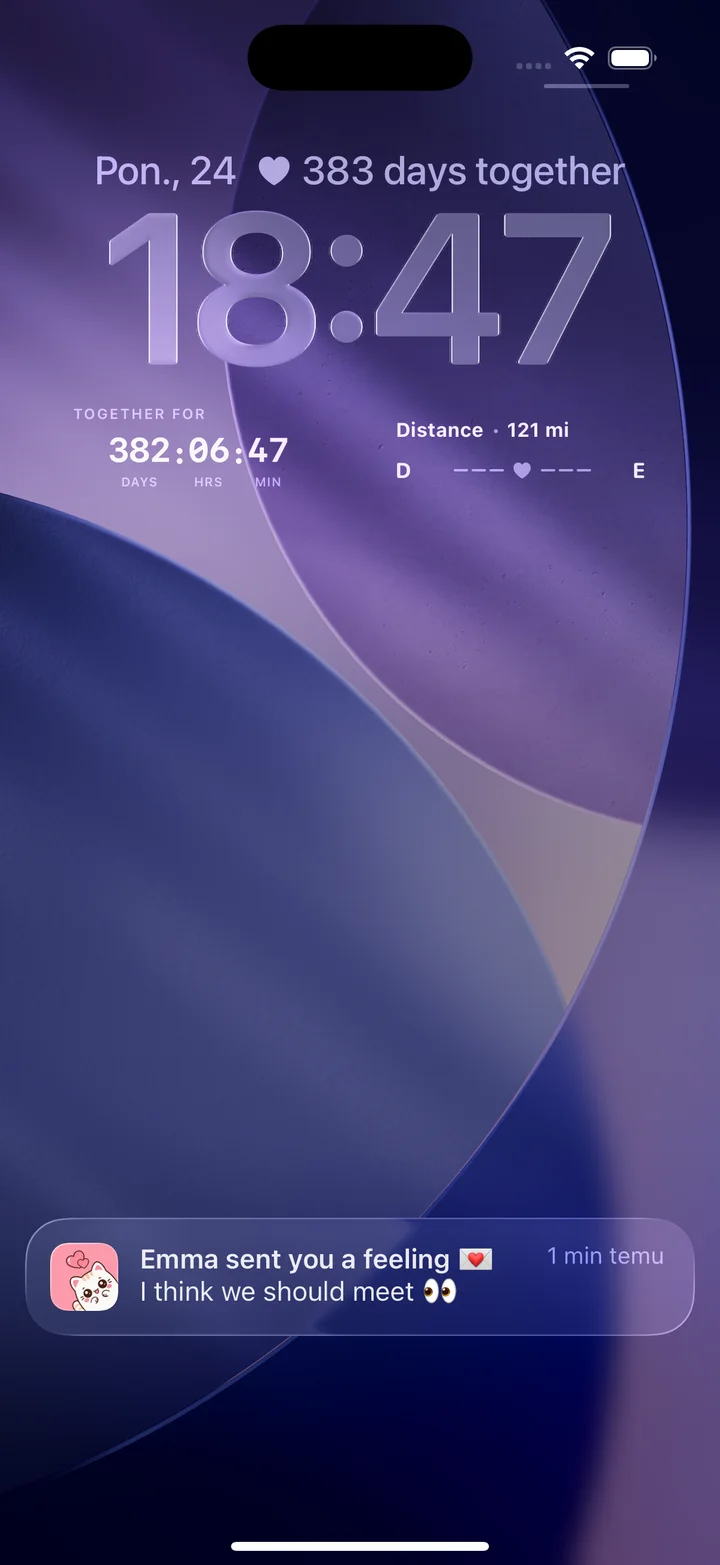
The Lock Screen in the picture above holds two days-together widgets: a short line next to the date, and a larger together-for timer below the clock, beside the distance widget. On the Home Screen, HeartSee's larger widgets can show a mood, a note, or the days left until an important date.
- Install HeartSee on both iPhones and pair with the invite code, or with the invite link added in version 1.10.5.
- Open HeartSee once so the shared space loads.
- Touch and hold the Lock Screen, tap Customize, then choose Lock Screen.
- Tap the line above the clock for a compact count, or the area below the clock for the larger timer.
- Choose HeartSee in the widget picker, pick the days-together design, and tap Done.
Related reading: Step-by-step: add a couples widget to the Lock Screen
Why does one screen show 383 days and the other 382?
Both numbers in the picture are right; they count in different ways. The line next to the date counts the day you are in, so your first day together is day 1. The timer counts completed days, hours, and minutes, so it starts at zero. The two are always exactly one day apart.
Other apps pick one convention and do not always say which. If your partner's app shows one day more than yours, this is usually why, not a bug. Decide which number you celebrate before day 100 or day 1,000 arrives.
Related reading: How many days have we been together? Milestones by day count
Which days-together apps let your partner see the same count?
LoveClock's listing says you "share a code or a link and see the same countdown on both phones", and Loveling's says you share your counter "so you're both counting the same days". HeartSee pairs two iPhones into one shared space with an invite code or link. Couple Widget: Love Countdown has a Couple Connect feature for liking and commenting on each other's posts, but its listing does not say the counter itself syncs.
inlove and Couple Widgets: Keep Memories do not describe pairing. They work as personal counters: each of you sets the same start date on your own phone. That is fine if you only want a number on your own screen, and it means neither of you depends on the other keeping the app.
What is each app best for?
All six count days together, so the difference is what comes with the counter. Minimum iOS versions range from iOS 13.0 to iOS 18.0, so check both phones before you agree on one app.
- Couple Widget: Love Countdown: the most-rated option here, with photo themes and a shared couple diary. Skip it if you want the count on the Lock Screen, which the listing does not mention.
- Couple Widgets: Keep Memories: a simple personal counter with partner names and photos on the widget, and the widest iOS support (iOS 13.0). Skip it if you want a count both of you share.
- HeartSee (our app): days together on the Lock Screen alongside distance, moods, notes, and drawings in a private space for two. Skip it if one of you uses Android, or if you only want a counter.
- inlove: a detailed live clock from years down to seconds, plus a diary and couple missions. Skip it if you mind ads, which the listing says the app contains.
- LoveClock: a shared countdown and counter with Lock Screen widgets, and a listing that says paired data is end-to-end encrypted. Skip it if either iPhone cannot run iOS 18.0, or you prefer an app with more ratings.
- Loveling: a shared "together for" counter with your photo on the Home and Lock Screen. Skip it if either iPhone runs a version older than iOS 17.0.
Which date should you count from?
There is no correct answer. Some couples count from the day they met, some from the first date, and some from the day they became official. Long-distance couples sometimes count from the first time they met in person. Pick the date that means most to both of you and use the same one in every app, so your widgets and your milestones agree.
If you keep a shared timeline of photos and dates, write down why you chose that date. It is the kind of detail that is easy to forget and nice to reread on an anniversary.
Related reading: Shared couple memory app and relationship timeline
What do these apps declare in their privacy labels?
Each developer fills in the App Privacy section of its listing, and Apple does not verify it. It shows data categories rather than exact uses, but it is a quick comparison before you add photos or names to a widget. This is what the US listings showed on 25 October 2026.
- Couple Widget: Love Countdown: identifiers used to track you; a device ID linked to you for advertising; photos and other user content not linked to you.
- Couple Widgets: Keep Memories: contact info used to track you; contact info, user content, usage data, and diagnostics not linked to you.
- HeartSee: identifiers used to track you; purchases, contact info, user content, and identifiers linked to you; precise location not linked to you.
- inlove: usage data used to track you; usage and advertising data linked to you.
- LoveClock: no data used to track you; only a device identifier, not linked to you.
- Loveling: identifiers used to track you; purchase history and a user ID not linked to you.
Frequently asked questions
Does iPhone have a built-in days-together widget?
No. Apple's widgets show upcoming events, times, lists, and photos, but none counts the days since a past date. You need a counter app with a widget, such as one of the six compared here.
Can a days-together widget go on the Lock Screen?
Yes, on iOS 16 or later. HeartSee, LoveClock, and Loveling describe Lock Screen widgets. On iOS 15 you can only use Home Screen widgets.
Does my partner need the same app?
Only if you want a shared counter. LoveClock and Loveling say both partners see the same count, and HeartSee pairs two iPhones into one shared space. Apps without pairing work as personal counters on each phone.
Why does my counter show one day more than my partner's?
One app probably counts the first day as day 1 and the other counts completed days. The difference is always exactly one day. HeartSee's Lock Screen shows both: the line next to the date and the timer below the clock.
Do time zones change the count?
Only around midnight. A counter moves to the next day at local midnight, so partners in different time zones can see different numbers for a few hours.
Are days-together widget apps free?
All six compared here are free to download. Most sell optional upgrades, priced from $0.99 to $39.99 on their listings; Couple Widget: Love Countdown listed no in-app purchases on 25 October 2026.
Sources and product information
Product and platform details were checked against these official pages. Store availability, pricing, and iOS behavior may change.
- Apple: Add, edit, and remove widgets on iPhone
- Apple: Create a custom iPhone Lock Screen
- Couple Widget: Love Countdown on the App Store
- Couple Widgets: Keep Memories on the App Store
- HeartSee on the App Store
- inlove - Couple Day Counter on the App Store
- LoveClock - Couple Countdown on the App Store
- Loveling: Our Love Widgets on the App Store