Widgetable Alternatives for Couples (2026): 7 Apps Compared
Seven Widgetable alternatives for couples compared on distance, Lock Screen widgets, drawings, iOS version, Android, and price, checked October 2026.
| App | Best for | Distance | Lock Screen | Drawings | Min. iOS | Android | Cost |
|---|---|---|---|---|---|---|---|
| Couple Joy | Distance and counters on iPhone and Android | Yes | Yes (distance widget) | Yes (to partner's Home Screen) | iOS 16.4 | Yes (Google Play link on its site) | Free; Premium $12.99 to $39.99 |
| Dumpling: Lock Screen Love | Notes and doodles on the Lock Screen | Not listed | Yes (messages, Live Activity) | Yes (doodles) | iOS 17.0 | Not found | Free; in-app purchases $4.99 to $34.99 |
| Embers | Love notes and stickies | Not listed | Yes (whisper widgets) | Yes (doodles) | iOS 17.0 | Not found | Free; Pro $4.99 a week to $59.99 lifetime |
| HeartSee (our app) | Moods, notes, drawings, and distance in a private space | Yes | Yes | Yes (release notes) | iOS 15.1 | No (iPhone only) | Free; Premium $4.99 to $39.99, weekly $7.99 |
| iFeely | Time zones, the next visit, and live doodles | Yes, plus local time | Yes | Yes (live on Home Screen widget) | iOS 18.6 | Not found | Free; Premium $4.99 a month, $23.99 to $39.99 a year |
| Locket | Live photos from up to 20 friends | Not listed | Not listed | Not listed | iOS 15.0 | Not checked | Free; Locket Gold $1.99 to $36.00 |
| Loverzz | Games and drawing together | Yes (5 styles) | Yes | Yes (shared canvas) | iOS 15.1 | Not found | Free; Pro $2.99 a week to $59.99 |
What is the best Widgetable alternative for couples?
It depends on which part of Widgetable you use. For distance on iPhone and Android, choose Couple Joy. For games and drawing together, Loverzz. For time zones and live doodles, iFeely. For notes on the Lock Screen, Dumpling or Embers. For photos only, Locket. HeartSee, which publishes this page, suits a private iPhone-only mix of moods, notes, and distance.
All seven are free to download with in-app purchases, and each one pairs two accounts, so plan on both of you installing it. Ratings differ by orders of magnitude. On 24 October 2026 the US App Store showed about 583 thousand ratings for Locket, 387 thousand for Widgetable, 40 thousand for Couple Joy, 2.3 thousand for Loverzz, and 13 for HeartSee. Embers and Dumpling had fewer than ten, and iFeely had too few to display.
How was this comparison made?
HeartSee publishes this article and is one of the seven apps. There are no paid placements and no affiliate links. Every fact in the table and the app sections comes from the app's US App Store listing, its release notes, or its own website, checked on 24 October 2026. We did not run the same hands-on test on every app. "Not listed" means we did not find the feature in those sources, not that the app cannot do it, and "Not found" under Android means our search found no Google Play version.
We also looked at Bondly: Couples Widget & Draw, but its US App Store listing was unavailable on 24 October 2026, so it is not included. Two other apps called Bondly have different features, which is a good reason to check the developer name before you install anything.
- Does it show the distance between you?
- Does it work on the Lock Screen as well as the Home Screen?
- Can you draw or write something that appears on your partner's screen?
- Which iOS version does it need, and is there an Android version?
- What does it cost after the free tier?
Related reading: Read our review methodology
What does Widgetable do, and why do couples look elsewhere?
Widgetable's US listing, titled "Widgetable: Besties & Couples", describes widgets for the Home and Lock Screen, real-time distance on the Lock Screen, a Pin It feature for snaps and doodles, Mood Bubble and Mood Jar, a Miss You widget, a sleep tracker, a plant widget, and virtual pets you care for together. It has 4.9 stars from about 387 thousand ratings and requires iOS 16 or later.
It is free to download. On 24 October the listing showed Premium at $4.99 a month or $19.99 a year, with a $1.99 monthly option also listed, and diamonds, pet eggs, and pet food sold separately. Its App Privacy section lists usage data as used to track you.
Couples tend to look elsewhere for practical reasons: Widgetable is built for friends as well as partners, much of it revolves around pets and an in-app currency, it needs iOS 16, or one of you wants fewer and quieter widgets. If Widgetable works for both of you, there is no reason to switch.
Couple Joy: best for distance on iPhone and Android
Couple Joy's listing describes couple widgets, the distance between you, mood sharing, a counter for how long you have been together, countdowns to birthdays, anniversaries, and plans, and a shared journal with photos. Its release notes add a distance widget above the time on the Lock Screen (version 4.23.0) and sending text and drawings to your partner's Home Screen (version 4.29.0). Its website links to a Google Play version.
It has 4.9 stars from about 40 thousand ratings, the most of any couples-only app here, and requires iOS 16.4 or later. Premium is listed at $12.99, $29.99, and $39.99; the listing does not say which period each price covers.
- Best for: couples on different phones who want distance and counters.
- Price: free; Premium $12.99 to $39.99.
- Platform: iPhone (iOS 16.4 or later) and Android.
- Skip it if: an iPhone in the couple cannot update to iOS 16.4.
Loverzz: best for games and drawing together
Loverzz describes Home and Lock Screen widgets, a distance widget with five visual styles, a favorite photo and love notes, a Time Together counter, a countdown to your next big date, and a shared journal with photos and locations. It also has a shared canvas where you "doodle together in real time", and games such as Battle Quiz, Would You Rather, and Never Have I Ever. You pair by sharing a code.
It has 4.6 stars from about 2.3 thousand ratings and requires iOS 15.1 or later. The listing says some features require a subscription; Pro is listed from $2.99 a week up to $59.99.
- Best for: couples who want games as much as widgets.
- Price: free; Pro $2.99 a week to $59.99.
- Platform: iPhone (iOS 15.1 or later); we found no Android version.
- Skip it if: you want a quiet app without games, or one of you uses Android.
iFeely: best for time zones and live doodles
iFeely's subtitle is "Share Mood, Steps & Distance". Its listing describes Home and Lock Screen widgets for moods, steps, days together, your next visit, and both your clocks, plus the distance between you, your partner's local time, and their weather. Doodles appear live on your partner's Home Screen widget as you draw, and a daily question and a step battle with Apple Health add something to do together.
You invite your partner with a link, and the listing says that when one of you gets Premium, you both have it. Premium is $4.99 a month or $23.99 to $39.99 a year. It requires iOS 18.6 or later and had too few ratings to display on 24 October.
- Best for: couples in different time zones who want both clocks at a glance.
- Price: free; Premium $4.99 a month or $23.99 to $39.99 a year.
- Platform: iPhone (iOS 18.6 or later); we found no Android version.
- Skip it if: either iPhone cannot run iOS 18.6, or you prefer an app with a longer track record.
Dumpling and Embers: best for love notes on the Lock Screen
Dumpling: Lock Screen Love sends emojis, doodles, short notes, or love letters that appear on your partner's Lock Screen "no unlocking needed", and a Live Activity keeps the connection visible. You connect with a 6-digit code. It requires iOS 17.0 or later, had 5.0 stars from 3 ratings, and lists in-app purchases from $4.99 to $34.99, including a one-off payment.
Embers is a sticky and love-note widget. A note with photos and doodles appears on your partner's Home Screen widget, "whisper" widgets add words to the Lock Screen, and you can share a mood with one tap. It requires iOS 17.0 or later, had 5.0 stars from 5 ratings, and Embers Pro runs from $4.99 a week to $59.99 lifetime. Its listing says your partner sees a note with "no app needed" but also describes invitation codes, so check how pairing works before you rely on it. Neither app lists a distance feature.
- Best for: Dumpling suits short messages on the Lock Screen; Embers suits notes with photos on the Home Screen.
- Price: free; in-app purchases from $4.99.
- Platform: iPhone (iOS 17.0 or later); we found no Android version of either.
- Skip them if: you want distance or games, or you prefer apps with more ratings.
Locket: best if you only want photos
Locket Widget shows live photos from your best friends on your Home Screen, with a limit of 20 friends. Its listing does not mention Lock Screen widgets, distance, or drawings. It has 4.8 stars from about 583 thousand ratings, requires iOS 15.0 or later, and Locket Gold is listed from $1.99 to $36.00.
If the only part of Widgetable you use is sending snaps, Locket is the simplest switch. For anything else, it is usually a second app rather than a replacement.
- Best for: photo swaps with your partner and a few close friends.
- Price: free; Locket Gold $1.99 to $36.00.
- Platform: iPhone (iOS 15.0 or later); Android not checked.
- Skip it if: you want distance, moods, or notes.
Related reading: Apps like Locket for couples, compared
HeartSee (our app): moods, notes, drawings, and distance in one private iPhone app
HeartSee: Couples Widget pairs two iPhones with an invite code. Its listing describes Home and Lock Screen widgets, the distance between you, moods, notes, drawings, small gifts, a shared daily streak, and a private memory book, with no public feed and no followers. Its release notes describe sending hand-drawn messages straight to your partner's screen, and say one Premium subscription covers both partners.
It has 4.8 stars from 13 ratings, so it is far newer and smaller than Widgetable. It requires iOS 15.1 or later, and Premium is listed from $4.99 to $39.99, plus a $7.99 weekly option. It has no virtual pets and no Android version.
- Best for: couples who want calm, private signals rather than pets and decorations.
- Price: free; Premium $4.99 to $39.99, weekly $7.99.
- Platform: iPhone only (iOS 15.1 or later).
- Skip it if: one of you uses Android, or the pets are why you like Widgetable.
Related reading: HeartSee couples widgets for iPhone
Which Widgetable alternatives show distance on the Lock Screen?
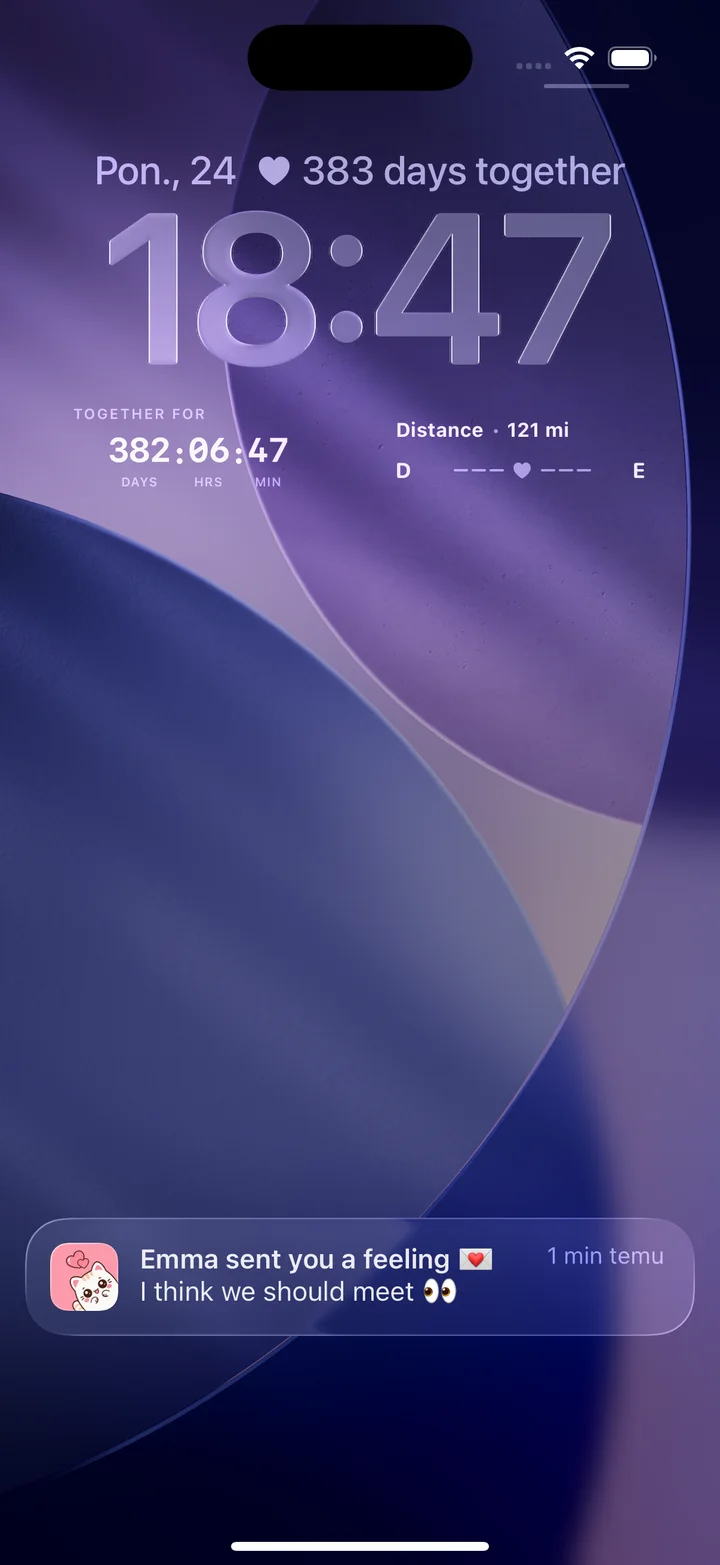
Three apps here say so directly: Widgetable itself, Couple Joy, whose release notes add a distance widget above the time, and HeartSee, whose Lock Screen widget shows distance next to days together, as in the picture above. Loverzz and iFeely describe both a distance feature and Lock Screen widgets, but their listings do not say the distance itself fits on the Lock Screen, so check the widget picker after you install. Locket, Dumpling, and Embers do not list distance.
Whichever app you choose, Lock Screen widgets need iOS 16 or later, and distance needs both partners to allow Location access on their own iPhone.
Related reading: How to show the distance between you and your partner on iPhone · Step-by-step: add a couples widget to the Lock Screen
How do you move your partner to a new widget app?
Switch together and slowly. A widget app only works when both of you keep it, so the order matters more than the app.
None of the listings we checked mention importing anything from Widgetable, so expect streaks, pets, and history to stay behind. Before paying, check whether one subscription covers both of you: HeartSee's release notes and iFeely's listing say it does, and the other listings do not say.
- Agree on the one thing you want from the new app, such as distance, notes, or a game.
- Check that both iPhones meet the minimum iOS version in the table, from iOS 15.0 to iOS 18.6.
- Install, pair, and allow only the permissions the feature needs.
- Add one widget each and live with it for a week before you remove Widgetable.
- Cancel any old subscription in Settings: tap your name, then Subscriptions.
What data do these apps declare in their privacy labels?
Each developer fills in the App Privacy section of its listing. It shows categories rather than exact uses, but it is a quick way to compare apps before you share location or photos. This is what the US listings showed on 24 October 2026.
A distance feature needs Location on both phones whichever app you pick. Read the developer's privacy policy as well, and agree with your partner on what is comfortable to show on a Lock Screen.
- Widgetable: usage data used to track you; health and fitness, location, identifiers, usage data, and diagnostics linked to you.
- Couple Joy: purchases, identifiers, and usage data used to track you; location, contact info, and user content among the data linked to you.
- Locket: identifiers used to track you; location, contacts, and user content among the data linked to you.
- Loverzz: identifiers and usage data used to track you; no data listed as linked to you.
- iFeely: health and fitness, precise location, contact info, user content, and identifiers linked to you.
- Dumpling: only identifiers and diagnostics, not linked to you.
- Embers: purchases, contact info, user content, identifiers, and usage data linked to you.
- HeartSee: identifiers used to track you; purchases, contact info, user content, and identifiers linked to you; precise location not linked to you.
Related reading: How to choose a private couples app: a checklist
Frequently asked questions
What is the best Widgetable alternative for couples?
It depends on what you use Widgetable for. Couple Joy suits distance on iPhone and Android, Loverzz suits games and drawing together, iFeely suits time zones, Dumpling and Embers suit love notes, Locket suits photos, and HeartSee suits a private iPhone-only mix of moods, notes, and distance.
Is Widgetable free?
It is free to download with in-app purchases. On 24 October 2026 the US listing showed Premium at $4.99 a month or $19.99 a year, a $1.99 monthly option, and diamonds and pet items sold separately.
Which Widgetable alternative works on Android?
Of the apps compared here, Couple Joy links to a Google Play version from its website. We found no Android versions of Loverzz, iFeely, Dumpling, or Embers, and HeartSee is iPhone only.
Which apps show the distance between partners on the Lock Screen?
Widgetable, Couple Joy, and HeartSee describe distance on the Lock Screen. Loverzz and iFeely describe distance and Lock Screen widgets but do not say the two go together. Lock Screen widgets need iOS 16 or later.
Can I draw on my partner's Home Screen without Widgetable?
Yes. iFeely shows doodles live on your partner's Home Screen widget, Couple Joy's release notes add drawings to the partner's Home Screen, Embers sends notes with doodles to a widget, Loverzz has a shared canvas, and HeartSee's release notes describe hand-drawn messages sent to your partner's screen.
Do both partners need to pay for Premium?
Not always. HeartSee's release notes and iFeely's listing say one Premium subscription covers both partners. The other listings do not say, so check before you subscribe.
Sources and product information
Product and platform details were checked against these official pages. Store availability, pricing, and iOS behavior may change.
- Apple: Cancel a subscription from Apple
- Widgetable on the App Store
- Couple Joy on the App Store
- Couple Joy website (Android and widgets)
- Dumpling: Lock Screen Love on the App Store
- Embers on the App Store
- HeartSee on the App Store
- iFeely on the App Store
- Locket on the App Store
- Loverzz on the App Store