How to Show the Distance Between You and Your Partner on iPhone
Put the distance to your partner on your iPhone Home or Lock Screen. What iOS does on its own, what a couples app adds, and how often the number updates.
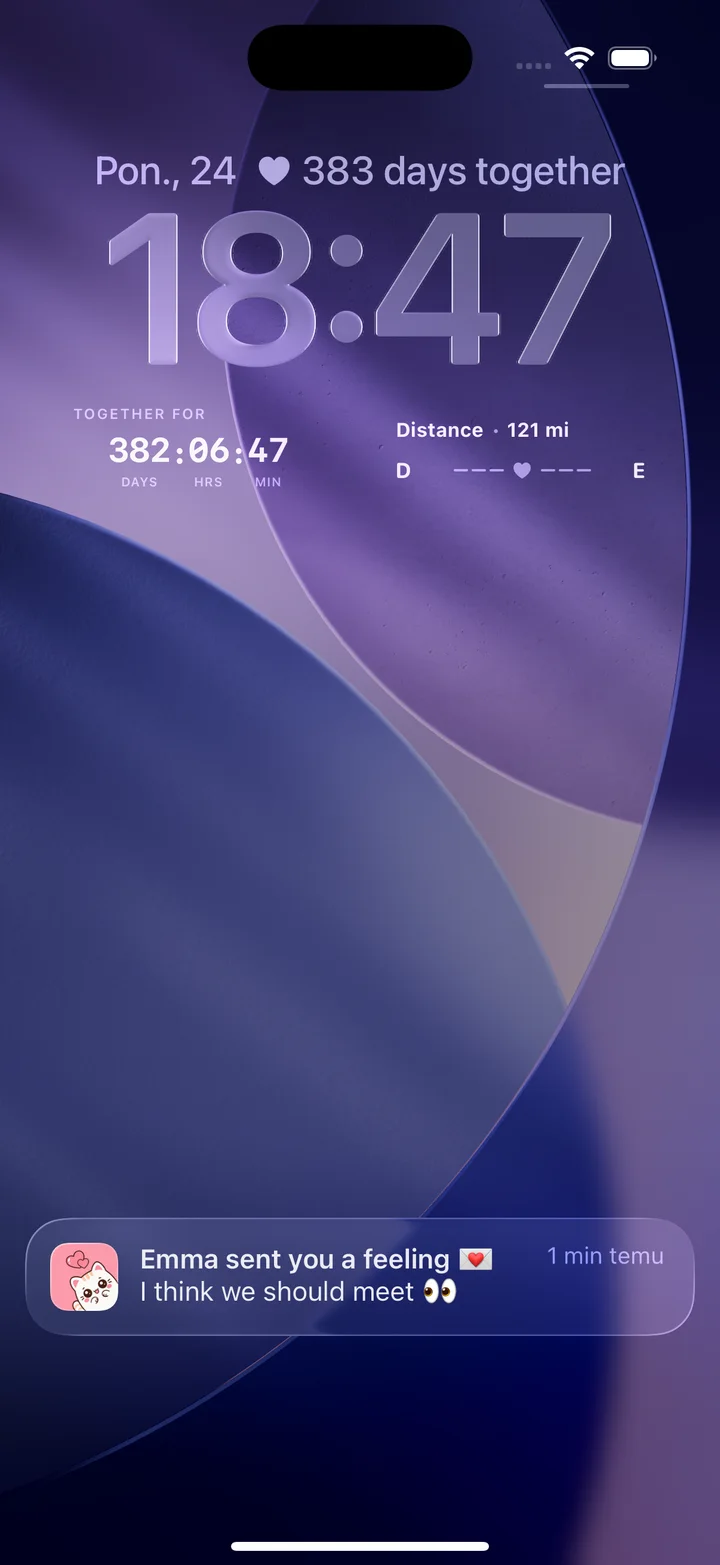
Can an iPhone show the distance to my partner without an app?
Partly. Apple's Find My app shows how far away a person is once they share their location with you, but you look at it inside the app. To keep the distance on your Home Screen or Lock Screen, next to things like moods, notes, and days together, you both install a couples app and pair. HeartSee is one: a private iPhone app made by Sagiware.
The two tools do different jobs. Find My is built for location sharing between friends and family, and its distance view needs Precise Location turned on. A couples app is built for glanceable shared signals, where distance is one item among several. Neither replaces the other, and you can use both.
Weiterlesen: HeartSee distance and location sharing · Couples widgets for iPhone
What do we both need before the widget works?
A distance widget needs two people, so most failures come from one side of the setup being incomplete. Check the list together before changing any settings.
HeartSee requires iOS 15.1 or later. Lock Screen widgets arrived with iOS 16, so on iOS 15 only the Home Screen option is available.
- HeartSee is installed on both iPhones.
- You have paired with the invite code.
- Both of you allowed the Location access the app asks for.
- Both iPhones have a data or Wi-Fi connection.
- You opened HeartSee at least once after setup.
How do I add the distance to my Home Screen?
Touch and hold an empty area of the Home Screen until the apps move. Tap the plus control, search for HeartSee, choose a widget and a size, then tap Add Widget. Touch and hold the widget and choose Edit Widget if you want to change what it shows.
A larger size leaves room for more than one signal. If you only want the distance, a small widget keeps the screen calm.
Weiterlesen: Step-by-step: add a couples widget to the Home Screen
How do I put the distance on the Lock Screen?
Wake the iPhone, touch and hold the Lock Screen, authenticate if asked, and tap Customize. Choose Lock Screen, tap the widget area above or below the clock, find HeartSee, and add the compact design. Tap Done to save.
Space there is limited, so you may need to remove another widget. The Lock Screen is visible before the phone is unlocked, so decide together whether a distance number is something either of you is comfortable showing in public.
Weiterlesen: Step-by-step: add a couples widget to the Lock Screen
How often does the distance update?
Not live. iOS decides when a widget may refresh. Apple's developer documentation says the budget is dynamic, depends on factors such as how often you look at the widget, and typically includes 40 to 70 refreshes a day for a widget you view frequently. Apple also says widgets that use Location Services are reloaded after a significant location change.
Those are Apple's general figures for widgets, not a measured HeartSee interval. In practice, treat the number as a recent snapshot. If it looks off, open HeartSee: the app shows the current value, and the widget catches up when iOS next refreshes it.
Weiterlesen: Couples widget not updating? Try these fixes
Is showing distance a privacy risk?
The widget shows a distance. What the app needs from iPhone is Location permission, and that permission is yours. You can review it in Settings, choose the level that the feature needs, and change it at any time. Read the app's privacy policy for what is stored before you agree.
Distance works best as context, a small reminder of how far a visit is. It does not work as a way to check where someone is. If either person starts to feel watched, turn the widget off and talk about it. Doing so should never be read as a sign of distrust.
Weiterlesen: How to choose a private couples app: a checklist
Which other apps can show distance on an iPhone?
Several couples apps list a distance widget in their own descriptions, including Couple Joy and Widgetable. Their features and prices change, so check each App Store listing before you and your partner choose one. Locket focuses on photos, not distance.
Pick the app that both of you will open. A distance widget only helps if you each keep the app installed and paired.
Weiterlesen: Best couples widget apps for iPhone, compared · Do couples widgets drain your iPhone battery?
Häufig gestellte Fragen
Does iPhone have a built-in distance widget for couples?
Apple's Find My shows how far a friend is inside the app once they share their location with you. A glanceable couples widget with distance, moods, notes, and days together comes from a couples app that both partners install and pair.
Do both of us need the app for the distance widget to work?
Yes. A couples widget compares two paired devices, so both partners install the app, pair with the invite code, and allow the Location access that the distance feature uses.
Is the distance on the widget live?
No. iOS schedules widget refreshes. Apple says a widget you view often typically gets 40 to 70 refreshes a day, so treat the number as a recent snapshot and open the app for the latest value.
Does the distance depend on time zones?
No. Distance depends on each phone's location permission and connection, not on the time zone. It works the same across a city, a country, or a border.
Can I turn the distance off?
Yes. You control Location access in iPhone Settings and can remove the widget at any time. Neither partner should feel pressured to keep it on.
Quellen und Produktinformationen
Produkt- und Plattformangaben wurden anhand dieser offiziellen Seiten geprüft. Store-Verfügbarkeit, Preise und iOS-Verhalten können sich ändern.
- Apple Developer: Keeping a widget up to date
- Apple: Share your location in Find My on iPhone
- Apple: Locate a friend in Find My on iPhone
- Apple: Create a custom iPhone Lock Screen
- Apple: Control the location information you share on iPhone
- Couple Joy: How to add a distance apart widget
- Widgetable on the App Store